
The assistant
In-chat actions
Limit what retrieval uses, dictate instead of type, and control what a chat keeps.
Typing a question is the start. The chat input also lets you limit what retrieval uses, how you enter a question, and what the conversation keeps.
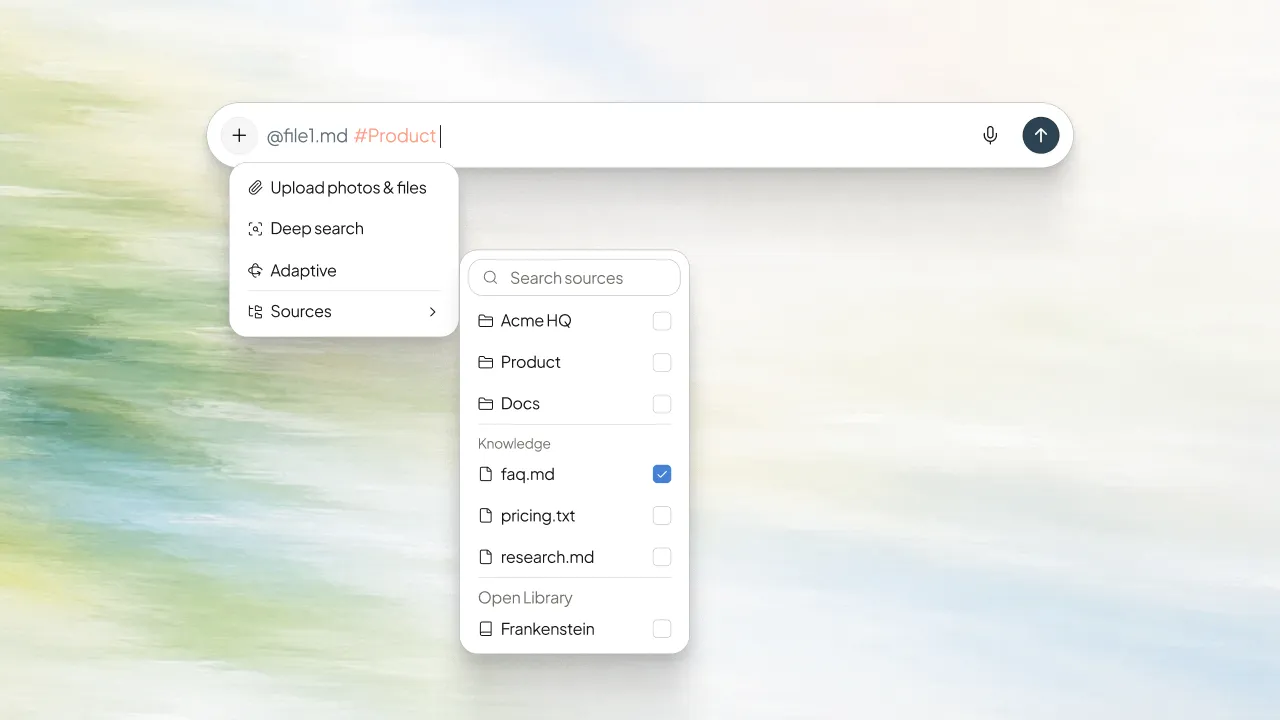
Limit retrieval to specific Knowledge
By default, retrieval uses this Space. When you already know where the answer lives, you can narrow it.
- Mention a document — type
@and pick a source from your Knowledge. Retrieval prefers that document when generating the answer. - Mention a Space — type
#to pull Knowledge from one of your My Spaces into the current conversation. Use it when you need context from another scoped Space.
Dictate instead of type
Use the microphone control to speak your question instead of typing it. Review the transcribed text, then confirm or cancel before it sends.
Work with a response
Every answer has per-message controls:
- Copy — copy the response to your clipboard.
- Regenerate — ask for a fresh answer to the same question when the first one misses.
Keep a chat off the record
Turn on Temporary chat to start a conversation that is not saved to History. Use it for quick, private questions you do not need to keep — nothing from a temporary chat appears in your saved conversations.